Seller University
Be a part of the evolving curation of the best US products, barrier-free shopping experiences, and market-leading shipping speed. Learn how to simplify your onboarding process and execute with efficiency at Coupang’s Seller University. Optimize your business today!
If you have any lingering questions or if you want more information on the different integration models, please email globalservices@coupang.com.

The Science of Selling, Simplified.
Success shouldn’t be a guessing game. Our curriculum breaks down complex marketplace dynamics into actionable strategies you can implement today. From detail page optimization to inventory management, we provide the blueprints you need to transition from a casual seller to a dominant brand.
Sell Smarter: Stop working harder and start leveraging our tools to their full potential. Our quick-start guides help you shave hours off your workflow so you can focus on what matters: your products.
Coupang Seller University Resources
Starting with Coupang
Register as a Seller
Are you wondering how to apply to join the Coupang Global Fulfillment program? Look no further! Please follow the steps below to complete the application process.
- Step 1: Go to https://wing.coupang.com/tenants/vendor-signup/signup. Complete the application and contracts, including providing the required business documentation (see below).
- Step 2: An Account Manager will reach out to you with the next steps if your application needs revision or is approved.
- Step 3: Once CGF permission is granted to your account, you will be ready to log into Wing and list your products!
Information needed for CGF application includes:
Product Registration Rules and Policies
Restricted Products
- Alcohol
- Cigarettes
- Drugs (CBD products, medicine, medical devices, and quasi-drugs)
- Examples of “Quasi Drugs” include menstrual products, bandages, antiperspirants, toothpaste, energy drinks, prescription products
- Products that violate copyright, trademark, or intellectual property laws.
- Please visit the link here for a more comprehensive look at our IP Policy.
- Self-defense products (electroshock weapons, compressed gas sprayer containing tear gas, etc.)
- Media products harmful to youth
- Child products that are not edible, used for eating, or hygiene items (products used by or for children aged under 14, toys, clothes, etc.)
- Supplements that include bovine, N-Acetyl-Cysteine (NAC), L-Citrulline, Echinacea, Hemp, Melatonin, Pygeum, CMIT/MIT, Slippery elm, Shilajit, or any other substance or product restricted by the Korea MFDS.
*For a more comprehensive look at our product restriction policy, please visit: https://www.foodsafetykorea.go.kr/portal/fooddanger/foodDirectImportBlockRawIrdnt.do
Korea MFDS maintains a list of restricted ingredients that are forbidden from import. This list is a summary and is subject to change.
Important Registration Rules
- Regardless of the available category, the sale of products explicitly targeting children under 13 is prohibited in all categories for CGF.
- When selecting category, please make sure that it matches the product sold. Seller has responsibility and obligation to correctly select and register the product category, and strictly comply with laws and regulations of relevant products.
- If category does not match the product being sold, product will also fail to pass the audit. If product is rejected due to a wrong category, seller needs to select correct category and submit audit application again.
- According to Coupang policy and regulations, the product will be removed from sale if its registered category does not match. This will happen even if the product is already on sale. Once a product is removed, Seller cannot re-list it and must register the product again.
- When registering product, please note the following when filling in the brand and manufacturer information.
- “No Brand” is a brand owned by eMart Group of Korea. Please do not use the word “No Brand” in any product information, including product title, detail page and brand name. If “No Brand” is filled in, product will fail to pass the audit.
- When filling in the brand, if it is a product without specific brand, please check “without brand (or homemade)”.
- When filling in the manufacturer, if the brand and manufacturer cannot be verified, please leave the field blank and do not fill in any content.
Shelf Life Guidelines
- For all perishable items, CGF products require a 90-day minimum shelf life. A product’s minimum shelf life is specified during the listing process. If the product’s remaining shelf life is less than the minimum specified shelf life, then the product will be suspended and disposed of at the seller’s expense.
An Introduction to Coupang Wing
Listing Products
- List an Individual Product
- List in Bulk
- List at Scale with Open API: View our Guides to get started.
There are also specific listing requirements for the Food and Beauty categories. Please see a focused look by category by visiting the Coupang Global Services YouTube channel.
Understand the Product Detail Page
The product detail page is where customers find all relevant information about an item. This includes:
Pricing Products
Many tools are available on WING to help sellers manage their sales. To gain insight into your sales and pricing, click on “Manage Prices.” Here, sellers can see which products are item winners, their product prices, recommended prices, sell prices over the last 7 days, and more.
- Sellers are first prompted to input their product prices during the listing process. To set your prices in the Product Options section in Wing:
- To set your prices:
- Enter number and quantity options for your products
- Enter the sales price per product option (you may need to scroll right).
- Sales price KRW is required to list
- Original price (KRW) is optional
- A sales price is required for every product option
-
Auto Pricing is an intelligent tool designed to help you stay competitive and maximize your sales without constant manual monitoring. By opting in, the system automatically adjusts your product’s price in real-time to help you win and maintain the Item Winner status. See here to learn more about Auto Pricing.
-
To enable, simply toggle on Auto Pricing and you can adjust your minimum price.
-
-
Sellers can update their price in bulk for all product options by downloading an Excel and uploading the file with price changes
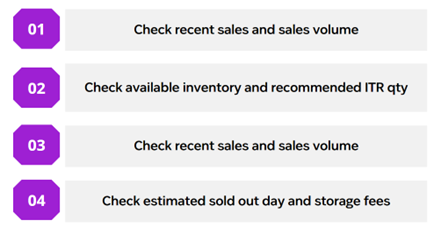
- You can check the sales status of products registered on CGF in our WING Seller Tool under Coupang Global Fulfillment > Manage Inventory.
- CGF provides inventory information to help sellers make decisions.
Preparing Your Products for the Fulfillment Center
Coupang requires a specific process for preparing your products to be sent to our fulfillment center.
Labeling Guidelines: Coupang requires individual products to be labeled with a Coupang Barcode. This code identifies your product as coming from your seller account, and is the item identifier we scan in this fulfillment program.
- Coupang Barcodes must be scannable: Barcodes must not be smeared, illegible, or curved around a product in a way that makes scanning impossible.
- Barcodes must not block important information (ex: expiry, lot code, nutrition facts).
- The Coupang barcode should be placed over the original manufacturer’s barcode when the label is applied directly to the product.
- Barcode Label Service: For a per-unit fee, the Coupang Riverside FC can add Coupang Barcode stickers as we receive your products. Opt in to this program by checking the appropriate box during the Inbound Request Verification step.
- Barcode Label Repair Service: If you choose to add Coupang barcodes yourself, Coupang offers Barcode Label Repair Service. If any units arrive with damaged or missing Coupang barcode labels, we will relabel those for a per-unit fee- saving you the hassle of returning products for relabeling. You can select this service during the Inbound Request Shipping Configuration step.
See more details in our Shipment and Routing Guide.
Packing Guidelines for CGF Products
Packing Guidelines
- When packing your products and sending them to the Riverside Fulfillment Center, make sure to follow the following guidelines:
- Boxes should be packed to protect items during transit.
- Damaged items will not be accepted and may result in extra fees to dispose of them properly.
- Each box should be 1 case pack of a single item. Do NOT mix multiple SKUs in the same case pack.
- If items are perishable, all items in a specific box should have the same expiration date.
- The expiration date MUST be visible on the box.
- At this time, all items are subject to Coupang overbox or envelopes. Shipping items in their own container (SIOC) is not yet available for CGF.
Parcel and Case Pack Guidelines
- Each parcel in a shipment should have the shipping label visible on the outside of the box.
- Each inbound shipment should have the manifest or packing list attached to 1 box in the shipment.
Pallet Guidelines
- Pallets must be shrink-wrapped in a clear, transparent shrink-wrap. The shrink-wrap should be tied or attached to the pallet, ensuring that the first wrap covers the pallet and base cartons. Pallets should be wrapped at a minimum of 5 times, ensuring the pallet doesn’t break apart in transit.
- Do not overhang the pallet.
- Pallets must be of at least Grade B, GMA 4-way type.
- No missing or broken boards on top or bottom.
- No cracks on top or bottom boards greater than 1/8” wide and 12” in length.
- Each box in a pallet should have the relevant shipping label attached.
- Each pallet should contain a shipment manifest or packing list.
Inbound Requirements and Limitations
CGF products can only be registered if they meet the following conditions:
- Product dimensions must not exceed 12 inches x 12 inches x 15 inches
- The weight of each item (SKU) must not exceed 50lbs
- Please comply with the following warehousing regulations when shipping. In the event of any violation, the warehouse will reject the inbound application, and the product will not be accepted for inbound.
- Items need to be inbounded as full case packs.
- One expiration date is required per case pack, and each box must have the same expiration date.
- Each box needs a shipping label, and at least one box needs a manifest. Both the shipping label and manifest can be printed off of Wing.
- If using pallets, each pallet must have the shipment label, state PO #ID, state PO #, company name, and pallet count (e.g. 1 of 4, 2 of 4, etc.).
- Each pallet must be shrink-wrapped in a clear, transparent shrink-wrap.
- Coupang Global, LLC reserves the right to refuse pallets without shrink wrap. The shrink-wrap should be tied or attached to the pallet, ensuring that the first wrap covers the pallet and base cartons. Pallets should be wrapped at least 5 times to ensure they don’t break apart in transit.
- If multiple SKUs are shipped in one container, be sure to separate the different SKUs clearly. If more than two SKUs are shipped in a container, each SKU should be packed separately in a small carton or PVC bag for physical isolation, so that the warehouse can directly identify all of the SKUs in the same container.
- If more than two SKUs are shipped in the same batch of inbound containers, be sure to keep the product barcode clear. If the physical barcode does not match the system SKU information, the warehouse may not be able to identify the product.
Fulfilling Customer Orders
How You Get Paid: Settlement
Settlement is the process through which sellers receive payment for their sales.
- Each month, sellers are paid for the prior month’s confirmed settlement period, minus applicable fees, with detailed breakdowns available in the Wing portal.
- Payments are issued only when the final settlement amount exceeds 1 million KRW; if the amount is below this threshold, it rolls over to the following month.
- Eligible settlement payments are disbursed on the 15th business day of the following month, and this excludes weekends and public holidays. For example: sales that finalized in April 2026 were settled on May 26th.
- There is also a settlement calendar 🔗 available in Wing.
Finding your settlement total:
Navigate to Wing’s left-side menu, click Settlement > Settlement Status 🔗.
- Expand the settlement period to see the status details.
- Detailed settlement reports can be downloaded by clicking “Download in Excel” on the Settlement Status page.
- Settled orders do not always coincide with the purchase confirmation month; to see the exact settled orders, you must download the settlement report.
- Generally GMV settlement will cover the 21st of the prior month – 20th of settlement month.
- For example: a May settlement payment could pay out for customer orders finalized April 21st – May 20th, and that settlement payment would occur the 15th business day in June.
What could cause a settlement issue or delay?
- Incorrect bank information can block settlement. Please check bank information in Wing under Seller Information> “Additional Information” page.
- Incomplete seller verification, also called KYC or “Know Your Customer” will delay settlement. Submit required documentation through the “Seller Information” page in Wing.
- This must be fully verified to successfully receive settlement payment.
- Contact the Coupang Pay team for issues with any submissions: kyc_doc@coupangpay.com
- Low sales: If fees exceed sales, the net settlement will show as 0. Outstanding fees can be settled through payment details shared in Wing if applicable.
- Minimum Settlement Amount: Final Settlement amount must be greater than 1M KRW, or approx. $650 USD
- Account suspension: Fraudulent or illegal activity, and/or violating Coupang seller policies may result in delayed or withheld settlement.
The Settlement Status page shows settlement amounts, and whether that settlement is pending, on hold, or in confirmed status.
- You can download order level details by clicking “Download in Excel”
- You can expand the Settlement Status search results to view an overview of the settlement calculation.
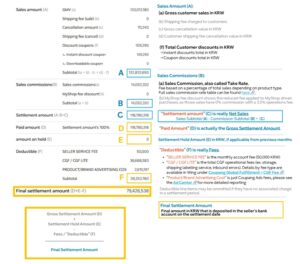
The Settlement Status overview shows helpful subtotals for each settlement period, but it contains some phrases that might be confusing.
We have added definitions and highlighted the math being used in the below example:
“CGF/CGF LITE” Fees – How to find more details about the CGF Operations Fees (shipping, storage, labelling, etc):
- Settlement Fee Details by fee type are available in Wing under Coupang Global Fulfillment > CGF Fee 🔗
- These fees are calculated by the calendar settlement month.
- For example: February’s fee period is 2/1 – 2/28, and those fees are applied to the “Deductible”(F) line in February Settlement (Paid out 15th business day of March).
- CGF fees are billed by calendar month, and do not align directly with the order level Settlement GMV cycle (~20th-21st).
- Downloadable reports can be found here including 1) daily fee estimate, 2) shipping and pick & pack fees by order, and 3) storage fees by item.
Settlement payment currency:
- All settlement payments are calculated in Korean Won (KRW) and are converted to United States Dollars (USD $) using the final day of the settlement month’s exchange rate.
- For example: May settlement uses the May 31st exchange rate (ex: 1507 KRW) to convert the Final Settlement Amount to USD, which is then paid on the 15th business day of June.
Growing with Coupang
Coupang Ads
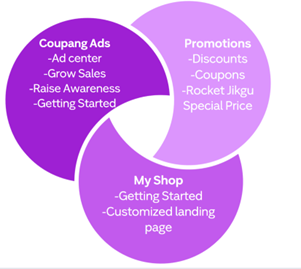
When you are ready to invest in marketing, there are 3 main types of onsite marketing available for CGF Sellers: Coupang Ads, Promotions, and My Shop.
- When you select a Campaign goal of “Grow sales”, this will lead you to create a Product Ad (PA) campaign. This means that the ad placements lead directly to your individual product detail pages.
- Product Ads are ads that show your products to customers searching for your item with a high likelihood of purchasing. PA are shown in the search results, product information pages, and main browse pages.
- Another great thing about Coupang Product Ads is that they are charged on a Pay Per Click (PPC) basis meaning you’re only charged when someone clicks on your ad.
- Some tips for Product Ads:
- You should allocate a daily budget of at least 30,000 KRW, otherwise your ad may run out of funds and lose out on potential impressions.
- Each campaign can contain up to 500 items.
- Don’t run multiple Product Ad campaigns with the same product.
- Set an ambitious but appropriate return on advertising spend (ROAS).
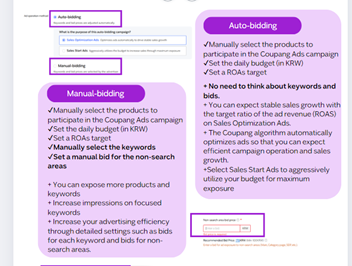
- There are 2 main ad types for Product Ads: Manual Product Setting and AI Smart Ads.
- If you choose Manual Product Setting you will then be able to select between Auto-bidding or Manual-bidding. Choose an ad type according to your situation and purpose.
Learn more about Coupang Ads by navigating to our 2026 Coupang Ads Guide
Advertise
Boost visibility and increase sales with Coupang Ads. Our advertising tools can help you reach more customers and grow your brand. Campaigns are easy to set up—and you can set your own bids and budgets.
Why Coupang Ads?
- Get discovered
- Advertising provides a visibility boost for your products and brand. Coupang Ads campaigns appear in highly visible placements.
- Increase sales
- Many shoppers come to Coupang ready to buy. Coupang Ads can help you reach customers who are looking for products like yours.
- Control costs
- Coupang Ads reports track ad spend and performance, so you can learn what’s working, fine-tune your campaigns, and optimize your advertising budget.
Learn more about Sales Optimization Ads.
Promoting and Advertising
Want to boost your sales? Set up a discount coupon on Coupang! At Coupang, there are two types of coupons – instant and downloadable. Instant coupons apply directly to the products. Downloadable coupons, on the other hand, apply when the total order amount reaches the amount set by the seller. Customers may download the coupons themselves.
Instant Coupons:
- Instant coupons enable sellers to directly apply discount coupons to the products they want. The monthly budget is set without a contract, and costs are deducted in settlement. You can freely set the budget, product, and period you want. “Instant discount-applied prices” are exposed to customers, which can greatly impacts sale.
Downloadable Coupons:
- A downloadable coupon can be used when the total order amount of coupon-applied items reaches the amount set by the seller. Customers can download the coupon themselves. “Coupon discount” will be displayed for products that have the downloadable coupon attached. On the product detail page, a banner that directs users to a page that shows only coupon discount products will be created.
Learn more in our US CGF Marketing Guide.
MyShop
Myshop Ads Management is a seller-exclusive page where you can collect your products and showcase them together. It can be used as a landing page for New Customer Acquisition ads, Raise Awareness ads or display ads, and you can showcase a variety of products together to customers who enter the page through ads.
To start with MyShop, sellers will first need to customize their MyShop basic settings. Sellers have the opportunity to input their MyShop name and introduction.
Afterward, make sure to upload two top images: one optimized for PC and one optimized for mobile. Once you have customized your MyShop URL, you can request approval for registration.
Get Product Reviews
After a customer buys a product, they can leave a public product review, a seller-feedback rating, or both. Try these tips to improve your chances of getting positive reviews and ratings:
- Accurately represent all of your products on your product detail pages.
- Pack your products according to our guidelines to help prevent damage during delivery.
- Respond to customer messages within 24 hours.
- Provide valid tracking numbers so customers can track their orders.
Seller Guides
Coupang Global Services provides multiple guides for our sellers to leverage. For quick links to download these comprehensive guides, please take a look below:
Learn the Key Terms
Awareness, Consideration, Conversion, and Loyalty: “Awareness,” “consideration,” “conversion,” and “loyalty” refer to different stages in the customer journey.
- Awareness: Customers recognize your brand and products.
- Consideration: Customers are deciding if your brand or products meets their needs.
- Conversion: Customers purchase your products.
- Loyalty: Customers continue purchasing your brand and products.
A+ Content
- Lead with benefits by showing what the product does for the customer.
- Follow a clear structure with a simple storytelling flow: Hero banner, key benefits, product details/how it works, comparison chart, lifestyle images, brand story.
- Keep text short and easy to read by using bullet points and icons. Prioritize mobile-friendly layouts and maintain clean, consistent visuals.
- Use high-quality visuals: Show the product in real-life use, highlight details (materials, size, quality), use infographics to explain features
- Build trust by including certifications, data, or proof points. Clearly demonstrate product quality and reliability.
- Use comparison charts to highlight key differences across products and help shoppers quickly choose between options.
Video Guides
Video Tutorials
Coupang Global Services has video guides on our YouTube Channel.
Designed specifically with our sellers in mind, this channel serves as your visual step-by-step guide to mastering the Coupang ecosystem. We break down complex processes into simple, easy-to-follow video tutorials, ensuring you have the knowledge you need right at your fingertips to drive your business forward.
Whether you are looking for a seamless walkthrough on listing your very first product or trying to master advanced features in WING (our powerful seller management tool), our content is tailored to your success. We tackle the most critical, day-to-day tasks and translate them into clear, actionable insights. Subscribe today and let us help you simplify your workflow, optimize your store, and unlock your full selling potential on Coupang!